How to Build a Faceless YouTube Channel in 2026 Without Posting AI Slop
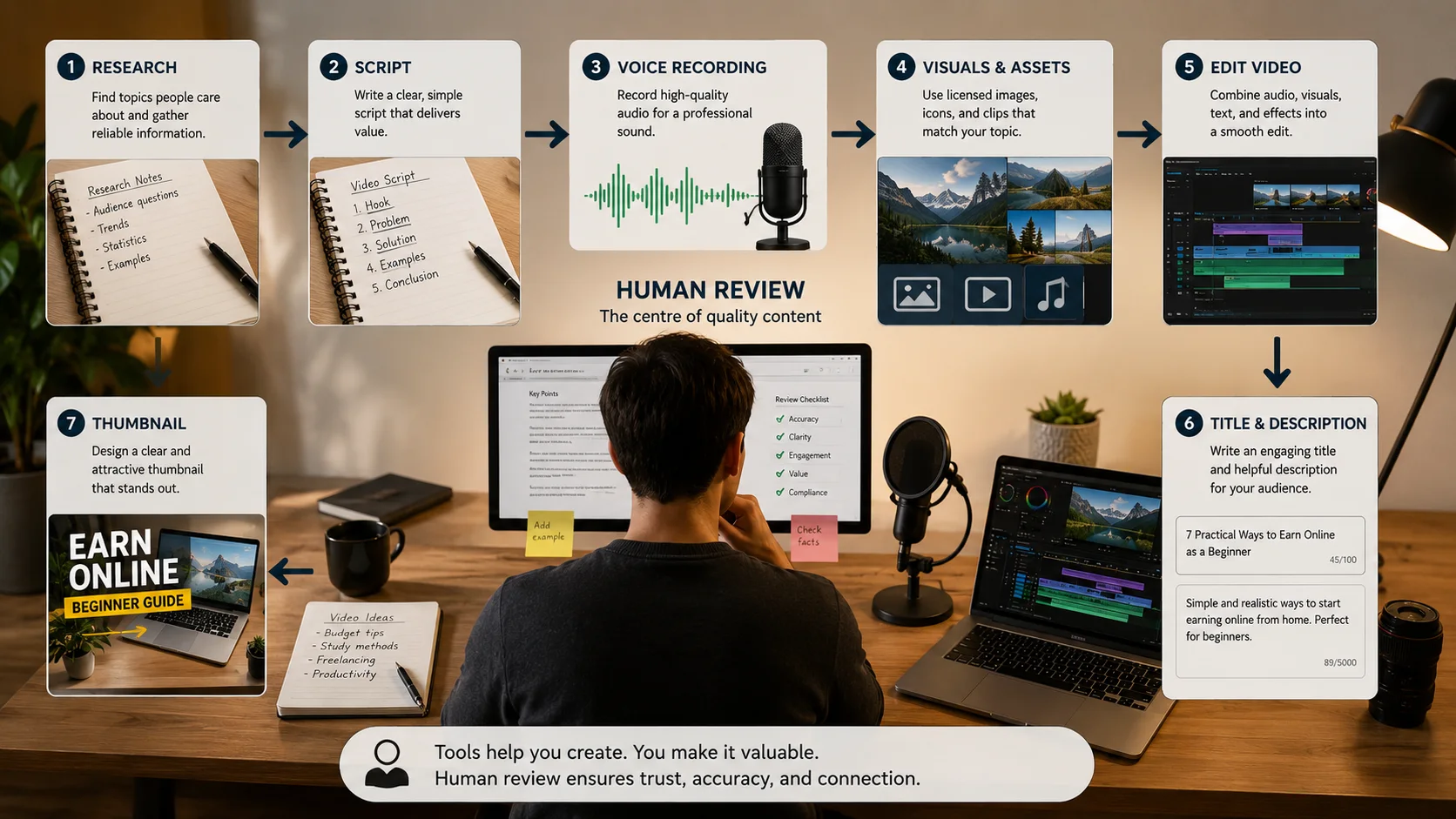
Faceless YouTube channels can work, but “faceless” does not mean effortless. You still need an idea people care about, a script worth listening to, visuals you are allowed to use, and enough editing to keep the video clear. AI can speed up parts of the process, but it cannot replace judgement.
I would rather publish one useful video with a clear point than upload ten automated videos that repeat information already everywhere. This guide shows the workflow I would use to build a channel that has a real identity even when the creator never appears on camera.
1. Pick a Topic You Can Add Something To
A niche is not only a broad category such as finance, technology, history, or motivation. It is the exact promise your channel makes to a particular viewer.
Compare these ideas:
- Too broad: Technology news
- Clearer: Simple explanations of budget Android features
- Too broad: Personal finance
- Clearer: Money systems for people with irregular side-hustle income
- Too broad: History
- Clearer: Short stories about inventions that changed daily life
Before choosing, write 30 possible video titles. If you run out after six ideas, the niche may be too narrow or you may not be interested enough to continue.
2. Decide What Makes Your Channel Recognisable
A faceless channel still needs a personality. That can come from the writing style, type of examples, pacing, visual layout, narrator, recurring segments, or the way you explain difficult ideas.
Write a one-sentence channel rule such as: “Every video explains one confusing money idea using a realistic monthly example.” This makes it easier to reject topics that do not fit.
3. Research Before You Ask AI to Write
Do not begin with “write me a ten-minute script about this topic.” First collect reliable source material, dates, definitions, and examples. For sensitive topics such as health, finance, law, or current events, use qualified and current sources.
Keep a research document with the source link, what it supports, and the date you checked it. AI can help organise notes, but you should open and verify the original source yourself.
4. Write the Hook Around a Real Question
A strong opening does not need fake drama. It needs to tell the viewer why the next few minutes matter. Start with a problem, surprising comparison, or clear promise.
Stronger: “You can follow a budget perfectly and still run out of money when your income arrives on random days. Here is the system that fixes the timing problem.”
The second version creates a specific reason to continue.
5. Build the Script in Sections
I use a simple structure:
- Hook: State the problem or result.
- Context: Explain why the usual advice is incomplete.
- Main points: Deliver the steps with examples.
- Proof or demonstration: Show the numbers, process, screen, or source.
- Takeaway: Tell the viewer what to do next.
Read the script aloud. Remove sentences you would never naturally say. Shorten repeated explanations and replace vague claims with examples.
6. Choose a Voice You Have Permission to Use
You can use your own voice without showing your face, hire a narrator, or use a licensed synthetic voice. Check the tool’s commercial-use terms and do not imitate a real person without permission.
A natural voiceover needs pauses, emphasis, and varied sentence length. Even a good synthetic voice sounds flat when the script is written like an article instead of spoken language.
7. Use Visuals That Explain, Not Distract
Stock footage alone often feels disconnected from the narration. Mix it with diagrams, screenshots you are allowed to show, charts, text highlights, screen recordings, maps, product demonstrations, and simple motion graphics.
Every visual should answer one question: What should the viewer understand right now? Change visuals when the idea changes, not every second just for the sake of movement.
8. Edit for Clarity and Retention
Remove long pauses, repeated lines, and introductions that delay the point. Add captions for key phrases, but keep them readable. Background music should support the video, not fight the narration.
Watch the final video once without sound and once while only listening. The first check shows whether the visuals make sense. The second shows whether the narration can stand on its own.
9. Create the Title and Thumbnail Together
The title and thumbnail should create one clear promise, not repeat the same words. Avoid claiming guaranteed income, impossible results, or facts the video does not prove.
Make the thumbnail understandable at phone size. One strong image and a few words are usually better than many tiny elements. Create two or three versions before choosing.
10. Publish on a Schedule You Can Maintain
A realistic schedule is better than daily uploads followed by burnout. If one researched video takes a week, publish weekly or every two weeks. Use a checklist so you do not forget sources, licences, captions, description, thumbnail, and final review.
11. Use Analytics to Find the Real Problem
Do not change everything after one weak video. Look for patterns across several uploads. Low impressions may point to topic demand or channel history. Impressions with few clicks may point to the title and thumbnail. Early viewer drop-off may point to a slow opening or a mismatch between the promise and the video.
Make one major change at a time so you can learn from it.
12. Build More Than One Possible Income Source
Advertising can be one income source, but it should not be the only reason the channel exists. Depending on the topic, a channel may also support affiliate links, a useful digital product, sponsorships, consulting, or a service.
Always disclose commercial relationships and check the current platform monetisation rules. Do not publish videos only to push links.
A Practical Production Checklist
- The topic answers a real viewer question.
- Important claims are verified using original sources.
- The script has a clear point of view and is not raw AI output.
- The voice and visuals are licensed for the intended use.
- The title and thumbnail accurately represent the video.
- The final video has been checked on mobile.
- Any affiliate or sponsored relationship is disclosed.
Common Mistakes That Make Faceless Channels Look Disposable
- Uploading scripts that repeat the first search result.
- Using the same stock clips as every other channel.
- Making claims without sources.
- Publishing AI voices with no editing or natural pacing.
- Copying another channel’s format too closely.
- Using misleading thumbnails.
- Choosing a niche only because somebody called it profitable.
Disclaimer: YouTube policies, monetisation requirements, and tool licences can change. Check the official current rules before publishing or monetising content.